
In brief
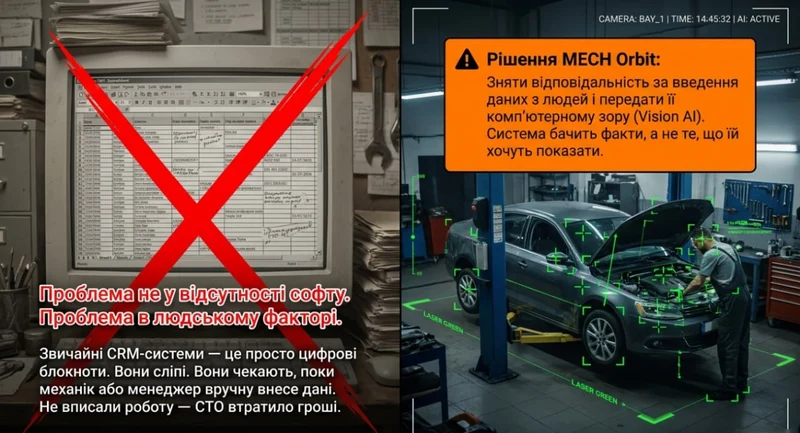
A standard CRM knows only what was entered. Video CRM adds an independent event source from the workshop floor and connects real activity to the digital workflow rather than replacing documents.
Most CRM systems for auto repair shops work on one principle: an employee does something — an employee enters it into the system. If they don't enter it — it didn't happen.
That's exactly the problem. In this article, we'll break down how Video-CRM differs from standard auto shop software — and why it matters for your bottom line.
What a Standard Auto Repair CRM Can Do — and What It Can't
A standard CRM helps you keep records: clients, work orders, amounts, statuses, repair history. That's useful. But this kind of system can't see what's actually happening in the repair zone.
What standard auto shop software can't see:
- When a vehicle actually entered the bay
- How long the car sat without any work being done
- When the mechanic actually started the repair
- Where a delay occurred between stages
- Why the shop lost a portion of its labor hours
The CRM only shows what was manually entered into it. Not what actually happened at the shop.
As a result, the owner often sees a clean report — but not the real picture. On screen everything looks fine: the work order is open, the status is set, the car is "in progress." In reality, the vehicle may have been sitting idle for hours, the mechanic may have been waiting on a decision, and the shop was losing money the entire time.
What Is Video-CRM and How Does It Work
This is exactly where Video-CRM comes in.
Video-CRM is a system that doesn't just store records — it helps you see real events happening in your shop. It combines standard management tools with visibility into what's actually going on in the repair zone, without relying on manual data entry.
To put it simply:
A regular CRM shows what employees entered into the system. Video-CRM shows what actually happened to the vehicle.
What an Auto Shop Owner Sees with Video-CRM
For the owner, this is a fundamental difference. Instead of just a summary — a full picture of the process:
- When the vehicle entered the bay
- When work actually started
- Where the downtime was and how long it lasted
- Where time was lost between repair stages
- Why one bay generates more revenue than another
This is no longer just accounting software. It's a management tool for your auto shop.
3 Signs Your Auto Shop Needs Video-CRM
Check yourself:
- Your reports look good, but actual revenue doesn't match the level of activity in the shop
- You can't explain why one bay consistently earns more than another at the same utilization rate
- You find out about delays and downtime after the fact — not in the moment when you could still do something about it
Regular CRM vs Video-CRM: What's the Difference
Regular CRM:
- Records only what was manually entered
- Shows records, but not events
- Gives you a summary, but not the process
- Depends entirely on the human factor
Video-CRM:
- Captures events automatically
- Shows the real picture in the repair zone
- Gives control over every stage of work on a vehicle
- Doesn't depend on whether an employee remembered to log something
Conclusion
Today, a standard CRM isn't enough for a high-performing auto shop. It helps keep records in order — but it doesn't give you full control over your processes. And wherever full control is missing, money is always being lost.
A regular CRM stores records. Video-CRM helps you see what's actually happening in your auto shop. That's exactly why it's built for shops that don't just want to track data — but want to actively manage their profit.
Want to see how Video-CRM works in MECH Orbit? Book a demo — we'll show you with a real example.
What to check in your workshop
- Are camera events linked to a vehicle and work order
- Are actual bay occupancy and idle time visible
- Can a manager move from a metric to the supporting evidence
Practical questions
Is this ordinary CCTV?
No. The value comes from linking a camera event to the vehicle, repair stage and workshop performance data.
Can existing cameras be used?
Most modern IP cameras that support RTSP or ONVIF can be checked for compatibility before connection.